
Writing · · 7 min read
What to Keep in Your Own Name
When someone builds a store, an app or a brand for you, four things decide whether you can keep running it without them: the domain, the payment account, the customer list, and the files with the rights to use them. The first three should be in your name from the first day. The files, and a signed transfer of the rights, should be yours by the last. If any of the four sits in the builder's name, getting it back takes their help.
This paper is for owners and founders about to hire someone to build a site, a store, an app or a brand. It covers what to keep and how to check it. It is general information, not legal advice: for the contract itself, talk to a lawyer.
The four things
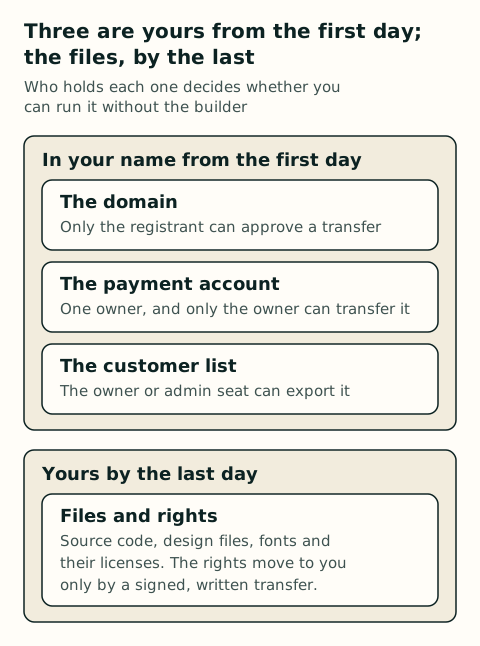
Each of the four has a gatekeeper: one person whose say-so moves it. The next four sections take them one at a time, with what to check before the work starts.
The domain
A domain is registered, not owned. ICANN, which sets the rules registrars follow, says so plainly: "You do not 'own' a domain name." What you hold is the registration, and the person named on it, the registrant of record, is the one who controls it. Under ICANN's Transfer Policy, the registrant "is the only party that has the authority to approve or deny a transfer request."
That is why the name on the record matters more than who paid. ICANN's own FAQ warns that a developer "may have registered the domain name using their own contact details (even if you have paid them…)" and so be "listed as the official Registrant of record." ICANN also advises against listing your website designer as the registrant, and against sharing your login.
| Check | Where | What you want to see |
|---|---|---|
| Who the registrant is | Your registrar's account page for the domain | Your business, or you, as the registrant |
| Whose account holds it | The registrar login | An account you opened, with your email and your password |
| Where the renewal notices go | The account's contact email | An address you read, not the builder's |
| Whether the details are current | The registration record | Accurate contact details. ICANN lets registrars suspend or cancel a registration whose details are inaccurate |
If the domain is already in someone else's name, they are the one who has to move it to you, because the policy gives only the registrant that say. Once the registrant asks, the registrar has to hand over the transfer code within five calendar days, unless it lets the registrant get the code directly.
The payment account
The payment account is where your money lands. Whoever owns it decides where payouts go and who else can get in. On Stripe and on Square, that power sits with one owner.
| Question | Stripe | Square |
|---|---|---|
| Who owns the account? | One person: "There can only be one Owner for an account." | The account owner |
| Who can hand it to someone else? | Only the owner can transfer ownership | "Only account owners can transfer ownership of a Square account." |
| Who can change where payouts go? | The owner, and anyone with an Administrator or Super Administrator role, who can add and edit bank details | "Only account owners can link and edit bank accounts." |
| Can a transfer be undone? | Not covered in the pages checked | No: "You cannot undo an account ownership transfer." |
| Can it move when the business is sold? | Not covered in the pages checked | No: "Square does not support transferring an account during the sale of a business." |
So open the account yourself, in your business's name, with your business's bank account for payouts. Then invite the builder with the narrowest role that lets them do the work. On Stripe, the Developer role can set up an integration and create API keys, but it can't add or edit bank details, invite people or change the owner. An Administrator can edit bank details, so think twice before handing that role to anyone outside the business.
The customer list
The customer list is how you reach last month's buyers again, and it stays useful long after the build is done. It usually lives in two places, the store and the email tool, and in both the top seats decide who can take a copy and who can take control.
| Tool | Who can export the list | Who can take over the account |
|---|---|---|
| Shopify | Customers export to a file from the store's admin | Not covered in the pages checked |
| Square | The customer directory exports to a file from the Customers menu | "Only account owners can transfer ownership" |
| Mailchimp | "Only Owners and Admins can export audiences." Each export stays downloadable for 30 days | An Owner or an Admin can transfer ownership to any other user on the account |
The Mailchimp row is the one to read twice. An Admin can make someone else the Owner, so a builder holding an Admin seat can take the account, list and all. Open the email account yourself and give the builder a lower role, or take their seat away when the work is done.
Owning the list also means deciding what not to keep. The Federal Trade Commission's guide for businesses puts it simply: "If you don't have a legitimate business need for sensitive personally identifying information, don't keep it." Its five steps are take stock, scale down, lock it, pitch it and plan ahead. Keep the names and emails you have permission to write to, and decide before the build what else the store needs to collect.
The files and the rights to them
Paying for work doesn't make you its owner. Under US copyright law, copyright "vests initially in the author," and when the author is an outside builder rather than your employee, that is the builder. Ownership reaches you in one of three ways.
| Path | When it applies | What it takes |
|---|---|---|
| Made by your employee | Your employee makes it as part of the job | Nothing more: the law treats the employer as the author |
| Commissioned as a work made for hire | Only nine kinds of work: a contribution to a collective work, part of a film or other audiovisual work, a translation, a supplementary work, a compilation, an instructional text, a test, answer material for a test, an atlas | A written agreement, signed by both sides, saying the work is made for hire. If any of that is missing, "it is not a work made for hire" |
| A written transfer | Any work | A transfer "in writing and signed by the owner of the rights conveyed" |
A logo, a website or an app may not fit any of the nine kinds, so a work-for-hire clause alone may not do what it says. Ask for a signed transfer of the rights as well, and for the files themselves: the source code, the original design files and the font files. Ask too for a list of what the builder didn't make, such as stock photos, licensed fonts and code libraries. Those stay under their own licenses.
Typefaces are a special case. Copyright law "does not protect typeface," in the Copyright Office's words, but the font software that draws it can be registered as a computer program when its code has enough original authorship, and the US Patent and Trademark Office has granted design patents on type fonts. For a custom typeface, get the font files and a written transfer or license that names the software and any design rights, and check that it lets you install the font, put it on your site and use it in an app.
A checklist before the build starts
Go through this before you sign. Each line is something you can check yourself.
- The domain is registered with you or your business as the registrant, in a registrar account you opened.
- Renewal notices for the domain go to an email address you read.
- You opened the payment account, in your business's name, paying out to your business's bank account.
- The builder has the narrowest role that does the job: on Stripe, Developer rather than Administrator.
- You are the Owner of the email tool, and the builder isn't an Admin there, or loses the seat when the work ends.
- You have exported the customer list once, to see that you can.
- The contract transfers the rights to you in writing, signed by the builder.
- The contract lists the files you get at the end: source code, design files, font files and their licenses.
- The contract lists the pieces the builder didn't make, with their licenses.
- You know what customer data the store will collect, and why it needs each piece.
How TresPies works on this
TresPies's line for this is "Handed over: to your team, on your accounts, in your language." When TresPies builds for you, the domain, the payment account and the customer list are set up in your name from the start, and the source files are handed over at the end.
To talk it through, book a 30-minute call.
Sources
Read on October 21, 2026. Help pages change, so check the current page before you rely on a detail.
- ICANN, frequently asked questions for registrants, on owning a domain and who is listed as registrant
- ICANN Transfer Policy, updated February 21, 2024, sections I.A.1.1 and I.A.5.2
- ICANN blog, "Do You Have a Domain Name? Here's What You Need to Know," March 26, 2018
- ICANN, registration data accuracy
- Stripe Docs: user roles
- Square: transfer ownership of your Square account and link and edit your transfer methods
- Square: export customer data
- Shopify: import and export customers
- Mailchimp: view or export your contacts and transfer ownership of an account
- Federal Trade Commission, Protecting Personal Information: A Guide for Business
- 17 U.S.C. chapter 2, sections 201(a), 201(b) and 204(a)
- US Copyright Office, Circular 30: Works Made for Hire (revised August 2024)
- US Copyright Office, Circular 33: Works Not Protected by Copyright (revised March 2021)
- US Copyright Office, Compendium, chapter 700, section 723, on computer programs that generate typefaces
- USPTO, Manual of Patent Examining Procedure, section 1504.01(a), on design patents for type fonts